
English QWERTY Typing Practice – Learn English Typing Online
Learn English Typing with NepalType
English typing is an essential computer skill for study, office work, programming, online communication, data entry, and everyday digital tasks. Learning to type accurately without constantly looking at the keyboard can save time, improve productivity, and make computer work much more comfortable.
NepalType provides free online English typing practice directly in your browser. You can practise letters, common English words, sentences, and full paragraphs while tracking your typing speed and accuracy. The practice system is suitable for complete beginners as well as experienced typists who want to improve their Words Per Minute (WPM), reduce typing mistakes, and develop a smoother typing rhythm.
Whether you are learning keyboard positions for the first time, practising touch typing, preparing for a typing test, or simply trying to type faster, NepalType gives you a structured place to practise English typing regularly and measure your progress.
Why English Typing Skills Still Matter
Typing is involved in almost every type of computer work. Students type assignments and research, office workers prepare documents and emails, developers write code, and businesses rely on keyboards for communication and data entry.
Being able to type quickly is useful, but speed alone is not enough. Good typing also requires accuracy, consistent finger movement, and the ability to type without repeatedly looking down at the keyboard.
Strong keyboard skills can make everyday computer tasks faster and reduce the amount of attention needed to find individual keys. As typing becomes more automatic, users can focus more on what they are writing rather than how they are entering each letter.
Regular English typing practice helps develop this familiarity over time.
Practice English Typing Online with NepalType
NepalType allows you to practise English typing directly in your browser without installing separate typing software.
Instead of practising only random letters, you can gradually work with letters, common words, sentences, and longer paragraphs. This helps learners move from understanding individual key positions to typing natural English text.
During practice, NepalType measures your typing speed and accuracy so you can see how well you are performing. These results make it easier to identify whether you are improving or simply typing faster while making more mistakes.
Beginners can focus on correct key positions and accuracy, while experienced typists can use longer exercises to improve speed, rhythm, and consistency.
Learn the English Keyboard Layout
A standard English QWERTY keyboard is named after the first six letters on the upper letter row:
Q W E R T Y
The main letter area is divided into three rows:
Top row:
Q W E R T Y U I O P
Home row:
A S D F G H J K L
Bottom row:
Z X C V B N M
Learning these positions is one of the first steps toward typing without looking at the keyboard.
English QWERTY Keyboard
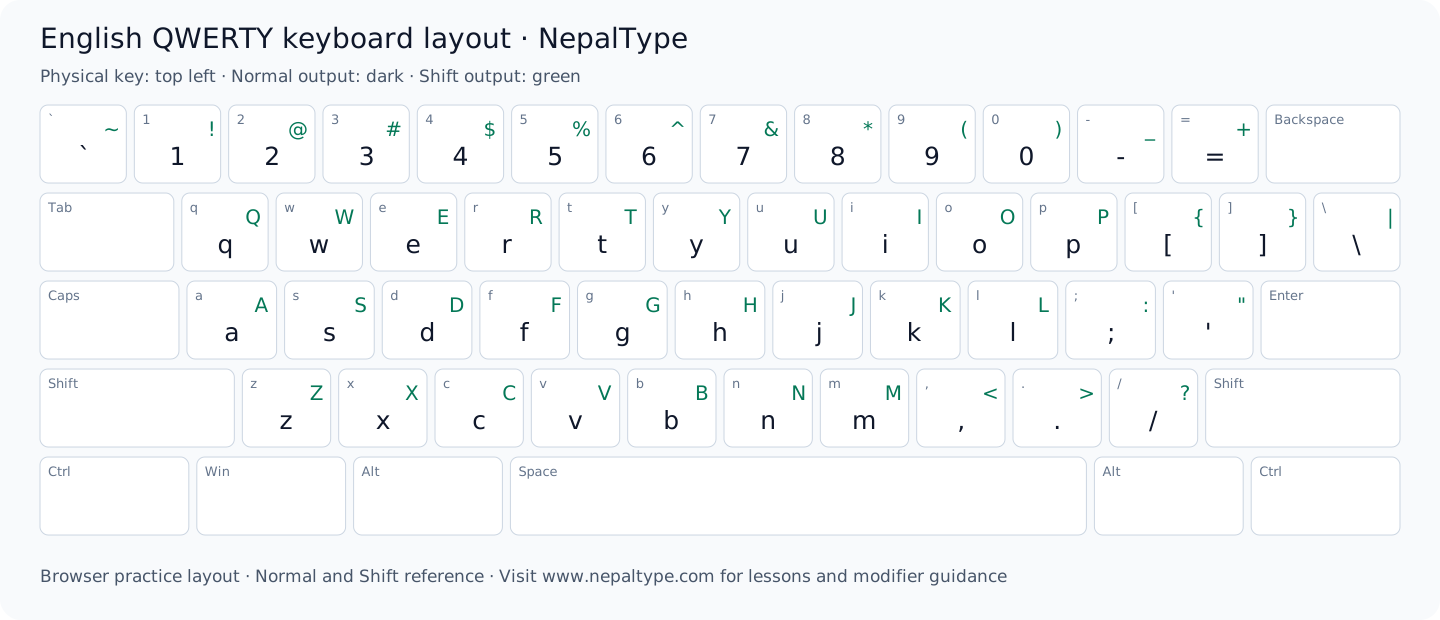
The home row is particularly important because it gives your fingers a consistent starting position. With regular practice, your hands begin returning to these keys naturally after reaching for letters on other rows.
The Home Row and Finger Placement
Traditional touch typing begins with the fingers resting on the home row.
The left hand normally rests on:
A – S – D – F
The right hand normally rests on:
J – K – L – ;
The F and J keys usually have small raised marks that help you find the correct hand position without looking at the keyboard.
Each finger is responsible for a group of nearby keys. Instead of using one or two fingers for everything, touch typing distributes the work across both hands.
This reduces unnecessary hand movement and helps develop a consistent typing pattern.
Beginners do not need to type quickly immediately. The first goal should be pressing the correct keys with the correct fingers as consistently as possible.
What Is Touch Typing?
Touch typing means typing primarily through keyboard memory rather than looking at every key before pressing it.
A skilled touch typist can keep their attention on the screen while their fingers locate the required keys automatically.
This ability develops through repetition. At first, learners may need to think carefully about each letter. With enough practice, common movements become part of muscle memory.
For example, words such as:
the
typing
computer
practice
keyboard
eventually become sequences of familiar finger movements rather than individual letters that must be consciously located.
NepalType helps learners build this familiarity by practising increasingly realistic English text.
Measure progress in this layout
WPM depends on how the exercise counts text and time, so compare results with the same duration and similar difficulty. A paragraph with capitals and punctuation is different from a lowercase word list. Track accuracy alongside speed and inspect the errors instead of treating a single high number as a stable result.
Why Typing Accuracy Matters
Accuracy measures how correctly you reproduce the text you are asked to type.
Typing mistakes interrupt rhythm and often require additional time to correct. In office work, data entry, coding, examinations, and professional communication, incorrect characters can also change the meaning of the information being entered.
This is why trying to type as quickly as possible from the first day is usually not the best approach.
A learner who types slightly slower but accurately is building stronger keyboard habits than someone who types quickly with frequent errors.
As accurate movements become automatic, increasing speed becomes much easier.
NepalType allows you to monitor accuracy during English typing practice so you can balance both parts of your performance.
Words, Sentences, and Paragraph Typing Practice
Typing individual letters is useful when first learning the keyboard, but real typing requires combinations of letters, spaces, punctuation, and complete words.
Word practice helps your fingers become familiar with common English letter combinations.
Sentence practice adds spaces, capitalization, and punctuation.
Paragraph practice develops longer typing rhythm and requires you to maintain concentration over a larger amount of text.
This progression helps bridge the gap between keyboard training and real-world typing.
On NepalType, learners can gradually move from simpler exercises toward longer English content as their confidence improves.
Common English Words Are Important for Typing Practice
Frequently used English words are valuable practice material because you encounter them repeatedly in normal writing.
Examples include:
the, and, that, with, from, have, this, your, will, about
Repeatedly typing common words helps your fingers learn frequently occurring letter patterns.
Over time, you may stop consciously thinking about each individual character and begin typing familiar words as complete movement patterns.
This is one reason word practice can help improve typing rhythm before moving into longer sentences and paragraphs.
How to Improve English Typing Speed
Typing faster is usually the result of better technique and familiarity rather than simply trying to move your fingers more aggressively.
Start by becoming comfortable with the keyboard layout and using consistent finger positions.
Try to keep your eyes on the screen instead of repeatedly looking down at the keyboard.
Practise regularly with real words and sentences rather than only random character combinations.
Most importantly, avoid sacrificing accuracy simply to increase WPM.
Once correct movements become automatic, your typing speed can increase naturally while requiring less conscious effort.
Common Typing Mistakes Beginners Make
One common mistake is looking at the keyboard after almost every letter. While this may feel easier initially, it slows the development of keyboard memory.
Another mistake is using only a few fingers instead of distributing keys across both hands. This can limit speed and require unnecessary hand movement.
Beginners may also chase a high WPM score too early and start typing faster than they can accurately control.
Poor posture, tense hands, and hitting keys harder than necessary can also make longer typing sessions uncomfortable.
Consistent practice with relaxed hands, correct positioning, and an emphasis on accuracy usually produces better long-term progress than trying to become fast immediately.
When to move to harder practice
Repeat a comparable exercise until your recurring errors decrease and you can enter its combinations without repeatedly consulting the chart. Then add one source of difficulty: longer text, punctuation, Shift keys or a longer duration. Learning time depends on prior keyboard experience and the consistency of practice; there is no fixed number of days for every learner.
English Typing for Students
Fast and accurate typing can make many student tasks easier.
Students regularly use keyboards for:
- assignments
- projects
- research
- online classes
- examinations
- presentations
- note-taking
Improved typing speed can reduce the amount of time required to enter information, while good accuracy can reduce corrections and editing.
Students who begin developing proper keyboard habits early can also benefit later when computer use becomes more important in higher education and professional work.
English Typing for Office Work and Jobs
Typing remains an important skill in many workplaces.
Employees may need to prepare documents, enter records, respond to emails, work with spreadsheets, communicate through chat systems, or use specialized business software.
Some data-entry, administrative, transcription, customer-support, and computer-based roles may also evaluate typing performance.
Where a job or examination specifies a typing requirement, candidates should check the exact speed, accuracy, duration, and testing rules rather than assuming every typing test uses the same standard.
NepalType can be used for regular English typing practice to improve familiarity, speed, and accuracy before working with longer professional content.
English Typing for Programming and Technical Work
Programming requires extensive keyboard use.
Developers frequently type letters, numbers, brackets, punctuation, symbols, commands, and code structures. Fast keyboard navigation and good typing accuracy can therefore make coding more comfortable.
However, programming speed is not the same as ordinary paragraph typing speed. Coding involves thinking, editing, navigating files, and using symbols more frequently than normal prose.
English typing practice can still provide a useful foundation by improving general keyboard familiarity and reducing the effort required to locate common keys.
An English punctuation-and-case exercise
Start with a short pair such as the The, then practise a sentence containing a comma, apostrophe and full stop. Return your fingers to their resting positions between words. Check whether errors occur on the letter, Shift transition or following space; practise that transition before repeating the paragraph.
English Typing vs Nepali Typing
English and Nepali typing both depend on keyboard familiarity, accuracy, rhythm, and muscle memory, but the layouts and character systems can be very different.
English typing normally uses the familiar QWERTY alphabet layout.
Nepali typing can use several methods, including:
Preeti
Standard Traditional
Traditional Unicode
Romanized Unicode
A user who becomes comfortable with English QWERTY typing may find Romanized Unicode easier to approach because it also uses QWERTY-oriented key positions.
Traditional Unicode, Standard Traditional, and Preeti require learning their own character mappings.
NepalType keeps these modes separate so users can practise the exact typing method they need.
Explore Nepali Typing on NepalType
If you also need to type Nepali, NepalType provides several dedicated practice modes.
Use Preeti Typing Practice when learning the traditional Preeti keyboard or working with Preeti-based content.
Use Traditional Unicode Typing Practice for fixed-position Unicode Nepali typing.
Use Standard Traditional Typing Practice when you need that specific keyboard layout.
Use Romanized Unicode Typing Practice if you prefer a QWERTY-oriented Unicode keyboard with familiar sound associations.
Each mode has its own practice page so you can concentrate on the correct keyboard without mixing different layouts.
Frequently Asked Questions About English Typing
Can I practise English typing online for free?
Yes. NepalType provides free English typing practice directly in the browser using letters, words, sentences, and paragraphs.
What does WPM mean?
WPM means Words Per Minute. It is a commonly used measurement of typing speed.
Should I focus on speed or accuracy first?
Beginners should generally focus on accuracy and correct key positions first. Speed becomes easier to improve after the keyboard movements become familiar.
What is touch typing?
Touch typing is the ability to type using keyboard memory and finger positioning without needing to look at every key.
How can I increase my English typing speed?
Practise regularly, learn the keyboard positions, use consistent finger movements, avoid constantly looking at the keyboard, and gradually increase speed while maintaining good accuracy.
Is English typing practice useful for typing tests?
Yes. Regular practice can help improve general speed and accuracy. If you are preparing for a particular examination or job, check its exact typing-test requirements as well.
Can beginners use NepalType for English typing?
Yes. Beginners can start with basic exercises and gradually move toward words, sentences, and full paragraphs as their keyboard familiarity improves.
Can I practise Nepali typing on NepalType too?
Yes. NepalType also provides Preeti, Standard Traditional, Traditional Unicode, and Romanized Unicode typing modes.
Start Practising English Typing
The best way to improve English typing is to practise consistently and focus on correct keyboard habits.
Use the NepalType English typing tool above to practise letters, common words, sentences, and full paragraphs while tracking your speed and accuracy.
Start slowly, learn the key positions, keep your eyes on the screen as much as possible, and allow your speed to increase naturally as your finger memory improves.