
Traditional Unicode Typing Practice – Learn Nepali Typing Online
Learn Traditional Unicode Nepali Typing with NepalType
Traditional Unicode is a position-based Nepali typing method that lets you type proper Unicode Nepali using fixed keyboard positions. Instead of spelling Nepali words through English pronunciation, as in Romanized typing, you learn where Nepali characters, vowel signs, symbols, punctuation, and Shift combinations are located on the keyboard. This makes Traditional Unicode useful for users who prefer a consistent keyboard layout and want to build typing speed through regular practice and muscle memory.
Because Traditional Unicode produces real Unicode Devanagari text, the Nepali content you type can be used in modern documents, websites, online forms, messages, and other Unicode-compatible applications. Learning the keyboard may feel difficult at first, especially if you are unfamiliar with fixed Nepali key positions, but repeated practice gradually makes the layout easier to remember and helps improve both typing accuracy and speed.
NepalType provides free online Traditional Unicode typing practice directly in your browser. You can practise individual Nepali characters, common words, sentences, and full paragraphs while tracking your typing speed and accuracy. Whether you are a beginner learning the Traditional Unicode keyboard for the first time or an experienced typist trying to improve your Nepali typing performance, NepalType gives you a structured place to practise regularly, build confidence, and become faster and more accurate.
Why Traditional Unicode Typing Is Useful Today
Nepali typing has changed significantly as computers, websites, mobile devices, and digital services have moved toward Unicode. Unlike older font-based systems, Unicode stores the actual Nepali characters rather than depending on a particular legacy font to make Latin character positions appear as Devanagari.
Traditional Unicode gives users a way to keep a position-based typing style while producing text suited to modern digital use. This can be particularly useful for people who prefer learning fixed keyboard positions instead of relying on phonetic or Romanized input.
Unicode Nepali text can be copied between compatible applications, searched on the web, stored in databases, used in online forms, and displayed with different Unicode Devanagari fonts without changing the underlying characters.
For people who like the speed and consistency of a traditional keyboard layout but also need modern Nepali text, Traditional Unicode provides a useful combination of both approaches.
Practice Traditional Unicode Typing Online with NepalType
NepalType allows you to practise Traditional Unicode typing directly in your browser without installing separate typing-practice software.
Instead of trying to memorize an entire keyboard chart at once, you can learn through actual typing. Practice can begin with individual characters and gradually move into common Nepali words, sentences, and complete paragraphs.
NepalType also provides immediate feedback through typing speed and accuracy results. This makes it easier to understand whether your typing is genuinely improving and where you may still be making mistakes.
Beginners can use the visual keyboard while becoming familiar with the layout, while experienced typists can practise longer content to develop better rhythm, consistency, and speed.
Understanding the Traditional Unicode Keyboard Layout
Traditional Unicode uses fixed keyboard positions for Nepali consonants, vowels, vowel signs, punctuation, numbers, symbols, and other characters. Additional characters or functions can also be available through Shift and key combinations.
Unlike Romanized Unicode typing, the physical key position matters more than how a Nepali word sounds when written with English letters.
Traditional Unicode Keyboard Layout
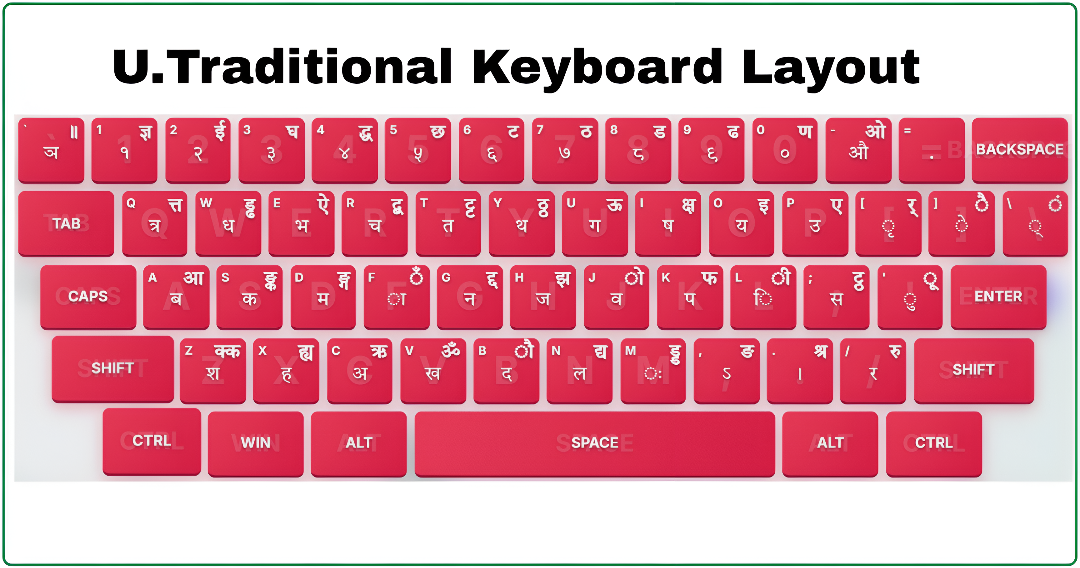
Traditional Unicode Nepali keyboard layout showing the Devanagari characters assigned to different keyboard positions.
The full keyboard may look difficult when you first see it, but learners do not need to memorize every key immediately. Repeated practice gradually creates a connection between a Nepali character and the finger movement needed to type it.
NepalType keeps a visual keyboard available during practice, allowing you to check unfamiliar characters while gradually becoming less dependent on the keyboard reference.
What Does Traditional Unicode Typing Look Like?
Traditional Unicode creates actual Nepali Unicode text rather than legacy text that only appears Nepali when a particular font is applied.
For example:
नेपाल
नेपाली भाषा
नेपाली टाइपिङ अभ्यास
नेपालमा नेपाली भाषाको प्रयोग
The text remains Devanagari when copied into Unicode-compatible applications because the actual Nepali characters are stored.
Traditional Unicode also follows the logical structure of Devanagari Unicode. A consonant can be combined with vowel signs and other marks to produce complete syllables.
For example:
क + ा → का
क + ि → कि
क + ी → की
क + ु → कु
क + े → के
Although ि appears visually before the consonant in कि, Unicode stores the consonant and combining vowel sign in logical order and the text-rendering system displays the final form correctly.
This is one of the important differences between learning Unicode character sequences and working with older legacy-font mappings.
Matras, Half Letters, and Combined Characters
Nepali typing involves more than individual consonants. Vowel signs, half letters, and संयुक्त अक्षर are an important part of writing natural Nepali text.
In Unicode, vowel signs are combined with a base consonant. For example:
क + ा = का
क + ि = कि
क + ी = की
क + ो = को
Half letters and many combined characters use the halant ् between consonants.
Examples include:
क + ् + त = क्त
त + ् + र = त्र
क + ् + ष = क्ष
ज + ् + ञ = ज्ञ
At first, these combinations may feel more difficult than typing individual letters. Regular word and sentence practice helps learners understand how characters behave together rather than memorizing them only in isolation.
For a deeper explanation of matras, Unicode character order, conjuncts, shortcuts, and technical behaviour, read our Complete Traditional Unicode Nepali Typing Guide.
Measure progress in this layout
Separate key-position mistakes from character-order mistakes. Practise one consonant-and-vowel sequence slowly, then compare timed passages containing that sequence. If a copied result has broken combinations, inspect its stored characters and the destination font before trying another physical key.
Who Can Use Traditional Unicode Typing?
Traditional Unicode can be useful for learners, students, office users, professional typists, data-entry workers, and anyone who prefers a fixed keyboard layout for Nepali typing.
People who already have experience with traditional position-based keyboards may find this style of typing more natural than phonetic input. New learners can also choose Traditional Unicode when they want to develop consistent muscle memory with a fixed Nepali keyboard.
It can also be useful when an institution, workplace, training course, or examination specifies a particular traditional Unicode layout.
Because keyboard requirements can vary, users preparing for formal typing tests should always confirm the exact keyboard layout mentioned in the current syllabus or official instructions.
Traditional Unicode vs Preeti Typing
Traditional Unicode and Preeti can both involve learning fixed keyboard positions, but the technology behind the resulting text is very different.
Traditional Unicode stores real Devanagari Unicode characters.
Preeti is a legacy font-based system where Latin or other character positions are displayed as Nepali-looking glyphs when the Preeti font is applied.
This difference becomes especially important when text is copied, searched, used on websites, or moved between devices.
Traditional Unicode text such as नेपाल remains Nepali text in Unicode-compatible applications. Legacy Preeti text may instead appear as English letters or symbols if the required Preeti font is unavailable.
Preeti therefore remains useful when working with existing Preeti files or workflows, while Traditional Unicode is much better suited to creating portable Nepali text for modern digital use.
Traditional Unicode vs Standard Traditional
Traditional Unicode and Standard Traditional are separate typing modes on NepalType.
Both produce Unicode Nepali text and both use fixed keyboard positions, which can make them appear very similar to new learners. However, their exact keyboard mappings are not identical.
Certain characters, punctuation marks, modifiers, or key combinations may appear in different positions depending on the selected layout.
This distinction matters when developing muscle memory. Constantly switching between two similar but different keyboards can lead to incorrect key presses and reduce typing accuracy.
NepalType therefore keeps Traditional Unicode and Standard Traditional as separate practice modes so users can practise the exact keyboard they need.
If your workplace, institution, course, or examination specifies one of these layouts, use that exact mode instead of assuming they are interchangeable.
Traditional Unicode vs Romanized Unicode
Traditional Unicode and Romanized Unicode both produce modern Unicode Nepali text, but the way users interact with the keyboard is different.
Traditional Unicode is position-based. You learn where each Nepali character is located and gradually develop muscle memory around those positions.
Romanized Unicode on NepalType uses a defined QWERTY-oriented layout where several key assignments have familiar sound-related associations.
For example, someone who prefers a fixed traditional keyboard may choose Traditional Unicode, while someone more comfortable with English QWERTY positions may find Romanized Unicode easier to begin with.
The final output from both systems is still Unicode Devanagari. The main difference is how the Nepali characters are entered, not the type of text produced.
Traditional Unicode Is Not Roman Nepali Transliteration
This distinction is important because the word “Unicode” is sometimes confused with automatic Roman-to-Nepali conversion.
Writing something such as:
mero naam santosh ho
is Roman Nepali written with Latin letters.
A transliteration tool may attempt to convert those sounds into Devanagari automatically.
Traditional Unicode works differently. It is a keyboard layout. Individual physical keys have defined Nepali outputs, and the typist learns those positions.
That makes Traditional Unicode particularly suitable for people who want consistent keyboard behaviour and wish to develop typing speed through muscle memory rather than depending on automatic word prediction.
A Traditional Unicode conjunct exercise
Use the displayed keyboard to locate क, the halant ् and ष. Enter क + ् + ष and inspect क्ष. Next build कि from क followed by ि. The font shapes these sequences; the left-hand appearance of ि does not mean it belongs first in stored Unicode text. Return to a short sentence after each sequence is comfortable.
Common Challenges When Learning Traditional Unicode
One of the first challenges is remembering where Nepali characters are located on an English-labelled physical keyboard.
Beginners may repeatedly look at the visual keyboard, which can make typing feel slow. This is normal during the early stages of learning a fixed layout.
Matras and combined characters can create another difficulty. Some vowel signs appear visually in a different position from where learners expect them, and संयुक्त अक्षर require the correct logical character sequence.
Another common mistake is mixing different keyboard layouts. Someone who practises Traditional Unicode one day and a different traditional layout the next may repeatedly confuse similar key positions.
Consistent practice with one selected layout makes it easier for finger memory to develop and reduces the need to consciously search for every character.
When to move to harder practice
Repeat a comparable exercise until your recurring errors decrease and you can enter its combinations without repeatedly consulting the chart. Then add one source of difficulty: longer text, punctuation, Shift keys or a longer duration. Learning time depends on prior keyboard experience and the consistency of practice; there is no fixed number of days for every learner.
Traditional Unicode for Office Work and Typing Exams
Unicode Nepali is useful in many modern digital workflows because the resulting text can be used across Unicode-compatible documents, web applications, databases, forms, email, and other software.
Traditional Unicode may therefore be useful for office users who prefer position-based Nepali typing while still needing modern Unicode output.
Students and job candidates may also encounter traditional Unicode layouts during computer training or typing-based examinations.
However, there is no single keyboard assumption that should be made for every examination or workplace. Candidates should check the latest official syllabus, notice, or keyboard specification before choosing a practice mode.
If the requirement specifically mentions Traditional Unicode, practising that exact layout is important because changing to Standard Traditional, Romanized Unicode, or Preeti can alter the key positions your fingers have learned.
Unicode Text and Fonts
Unicode and fonts are not the same thing.
Unicode defines the characters stored in the text, while a font controls how those characters look on screen.
For example:
क
is the Devanagari letter KA and has the Unicode code point U+0915.
Changing between compatible Devanagari fonts may alter its shape slightly, weight, spacing, or style, but the underlying character remains क.
This is why Unicode Nepali can work across different systems without depending on one specific legacy font.
Traditional Unicode therefore does not require Preeti-style font encoding to preserve the meaning of the typed text.
Explore Other Nepali Typing Methods
Traditional Unicode is one of several typing methods available on NepalType.
If you need to work with older legacy Nepali documents, explore Preeti Typing Practice.
If your requirement uses a different standardized fixed layout, use Standard Traditional Typing Practice.
If you prefer a QWERTY-oriented Unicode keyboard with more familiar sound associations, try Romanized Unicode Typing Practice.
NepalType also provides English Typing Practice, allowing learners to practise both Nepali and English typing on the same platform.
Frequently Asked Questions About Traditional Unicode Typing
What is Traditional Unicode Nepali typing?
Traditional Unicode is a position-based Nepali keyboard method that produces real Unicode Devanagari characters. Users learn fixed keyboard positions instead of typing Nepali words through English pronunciation.
Can I practise Traditional Unicode typing online?
Yes. NepalType provides free Traditional Unicode typing practice directly in the browser with characters, words, sentences, and paragraphs.
Does Traditional Unicode produce real Nepali Unicode text?
Yes. The resulting text is stored as Devanagari Unicode rather than legacy Latin character positions displayed through a special font.
Do I need to install Preeti font for Traditional Unicode?
No. Traditional Unicode does not depend on the Preeti legacy font. Unicode-compatible Devanagari fonts can display the resulting Nepali characters.
Is Traditional Unicode the same as Preeti?
No. Both may use position-based typing, but Preeti is a legacy font system while Traditional Unicode stores actual Devanagari Unicode characters.
Is Traditional Unicode the same as Standard Traditional?
No. Both produce Unicode Nepali on NepalType, but their exact keyboard mappings differ. NepalType therefore provides them as separate typing modes.
Is Traditional Unicode the same as Romanized Unicode?
No. Traditional Unicode uses traditional fixed key positions. Romanized Unicode on NepalType uses a different QWERTY-oriented mapping. Both can produce Unicode Nepali.
Why does ि appear before the consonant?
The vowel sign ि is logically associated with the consonant but is visually rendered before it in Devanagari. Unicode stores characters in logical order while the text-rendering system determines their final visual position.
Can I copy Traditional Unicode text into Word or websites?
Because the output is Unicode Devanagari, it can generally be copied into Unicode-compatible documents, websites, forms, messages, and other applications.
Is Traditional Unicode useful for typing exams?
It can be when a particular examination or institution requires that layout. Always check the latest official keyboard requirement rather than assuming every Nepali typing examination uses the same system.
How can I improve my Traditional Unicode typing speed?
Learn the correct key positions first, concentrate on accuracy, and practise regularly with increasingly longer words, sentences, and paragraphs. Speed becomes easier to develop once the keyboard positions become part of your muscle memory.
Start Practising Traditional Unicode Typing
The most effective way to become comfortable with Traditional Unicode is to use the keyboard regularly.
Use the NepalType Traditional Unicode typing tool above to practise individual characters, Nepali words, sentences, and complete paragraphs while following your speed and accuracy.
Begin with correct key positions, practise consistently, and gradually rely less on the visual keyboard as your muscle memory improves.